MultiView: Simultaneous Device Preview for Responsive Web Testing
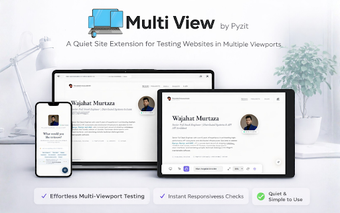
MultiView - Device Responsive Simulator, from multiview.dev, is a Chrome extension built for responsive web design and testing. It displays a single URL across multiple device frames while mirroring interactions for side-by-side comparison. Key capabilities include synchronized scrolling and inputs, custom device profiles, screenshot capture, and orientation toggles. The tool targets front-end developers, UI/UX designers, and QA engineers who need quick visual parity checks across several resolutions during iterative development.
How it shows layout differences at a glance
MultiView displays the same page in multiple device viewports simultaneously, which lets teams compare rendering across smartphone, tablet, and desktop frames without resizing windows. The extension mirrors user actions such as scrolling, clicking, and typing across all visible viewports, so visual regressions become obvious in a single pass. This approach removes the repetitive step of loading the same URL repeatedly in separate emulators.
How it fits into a front-end workflow
The extension consolidates testing into a single browser tab, reducing context switching when validating responsive layouts during development. It can load any URL your browser can access, including localhost and internal staging sites, so developers can test in place. That single-tab workflow accelerates iteration on CSS and layout changes by keeping multiple previews in view while editing code in a separate window or editor.
How customizable the simulated environments are
MultiView supports saved device profiles and interactive controls. Users can add and reuse custom resolutions, toggle portrait or landscape orientation, and capture screenshots of individual viewports or the entire workspace. It also integrates with Chrome DevTools for element inspection, and it works in Chromium-based browsers, which helps teams that use different Chromium browsers during testing. Key interface controls are accessible directly from the extension workspace.
MultiView is a practical visual QA tool for iterative front-end teams
As an in-browser simulator that requires no external setup, it suits developers and designers who need rapid visual comparisons across sizes. Expect faster layout checks in early sprints, while final validation still depends on device-specific testing and deeper debugging workflows. For teams focused on visual parity and quick feedback loops, this extension is a pragmatic addition to a development toolkit.